We built TallyKnot Local for people who just want to write down their money without signing up for anything. Make a ledger, note what comes in and what goes out, and check the charts whenever you are curious. It all stays in this browser, on your device.
Already have an account? Log in to TallyKnot online
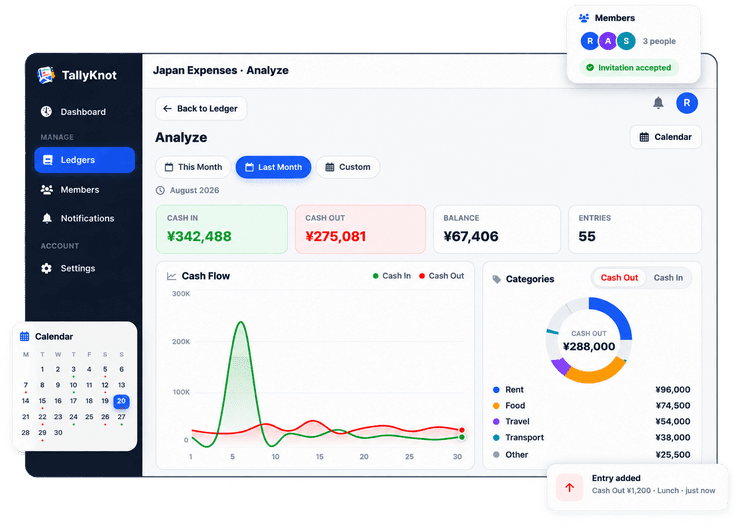
Each ledger comes with an Analyze screen. It shows how money moved over the month, which categories took the most, and how you paid. If one day looks odd, open the calendar and look at just that day.
This month
There is no setup to get through. Open it, give your first ledger a name, and start writing things down.
We do not ask for an email or a password. Add your name if you like, or skip that and go straight in.
Give it a name, an icon and a currency. Make a separate one for each thing you want to keep track of.
Write down each amount with as much or as little detail as you want. You can change or remove it later.
The charts show where the money went. The calendar lets you look at one day at a time.
You get the same ledger, entry and analyze screens people use in TallyKnot online. We only left out the parts that cannot work without an account.
Keep one for home, one for a trip and one for the shop. Each ledger has its own name, icon, colours and currency.
Adding an entry takes a few seconds. Made a mistake? Edit it or delete it, and the totals fix themselves.
Add a category, how it was paid, who it was with, a reference number or a short note. Use only the ones you care about.
Looking for one payment from weeks ago? Search by name, note or reference, or narrow the list by type, category and dates.
A cash flow chart and breakdowns by category and payment method. Look at this month, last month, everything, or dates you pick.
Days where money moved get a green or red dot. Tap any day to see what came in and what went out.
Neither one costs anything. Local is the quickest way to begin. An account is worth it once you want your phone, other people, or a backup you do not have to think about.
The quickest way to begin. Good for trying TallyKnot, or for a private cashbook you only need on one device.
For records you cannot afford to lose. One free account covers your phone, the web and the people you share with.
| What you get | Local | Online |
|---|---|---|
| Account needed | No | Free account |
| Where your data lives | This browser only | Your TallyKnot account |
| Ledgers, entries and categories | ||
| Analyze charts and calendar | ||
| Use it on your phone and any computer | ||
| Android app, in sync with the web | ||
| Share a ledger with members | ||
| Notifications | ||
| Download Excel and PDF reports | ||
| Safe if this browser's data is cleared | ||
| Price | Free | Free |
Local ledgers stay in this browser. Logging in does not move them into your account. Log in to TallyKnot online
That is why there is a free Android app. Add an entry while you are still at the counter, keep going when there is no signal, and share a cashbook with family or the people you work with. Sign in on the web later and it is all there.
In this browser, on this device. We use the browser's own storage, and nothing you type into TallyKnot Local is sent to our servers.
They do not expire. They stay until this browser's site data is cleared. Please know that clearing your browser data, or using a private window, removes them, and we have no copy to give back. If losing these records would hurt, a free TallyKnot account keeps them safe online.
No. A local ledger only exists in the browser where you made it. If you want the same cashbook on your phone and on other computers, that is what the free account is for.
No, not on their own. An account starts with its own ledgers. Your local ones stay here in this browser, and you can keep using them as before.
The things that need an account: inviting members, notifications, Excel and PDF downloads, and syncing with the Android app. The rest works, Analyze and the calendar included.
Yes. TallyKnot Local, the web dashboard and the Android app are all free.
Open TallyKnot Local, name a ledger and write down the last thing you paid for. You do not need an account, and it costs nothing.
 TallyKnot