 TallyKnot
Tracking shared expenses can become confusing surprisingly quickly.
One person pays for groceries. Someone else pays an electricity bill. Another person receives money that belongs to the same household, trip or project. If everyone keeps their own notes, sooner or later those records have to be compared and combined.
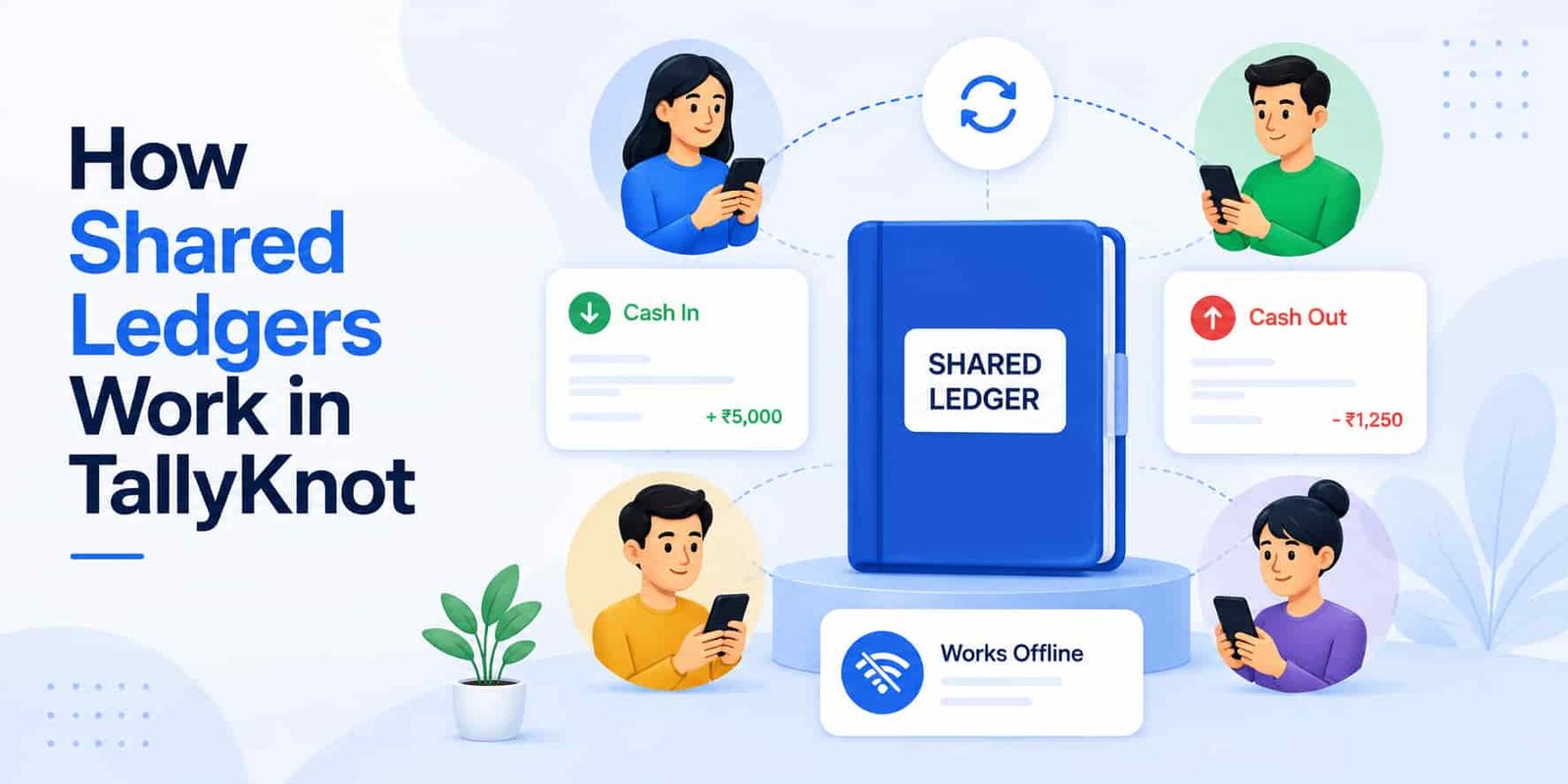
TallyKnot takes a different approach. Instead of creating several separate records for the same pool of money, you can invite trusted people into one shared ledger.
Everyone who has active access works with the same ledger. Members can record their own Cash In and Cash Out, and TallyKnot synchronizes accepted changes so other devices can receive the latest records and totals.
In this guide, we'll look at the complete process — from inviting the first member to what happens when two people add, update or delete transactions from different phones.
Download TallyKnot for free and start tracking your money today. Create ledgers, record Cash In and Cash Out, organize expenses and keep your everyday money records in one place.
What is a shared ledger in TallyKnot?
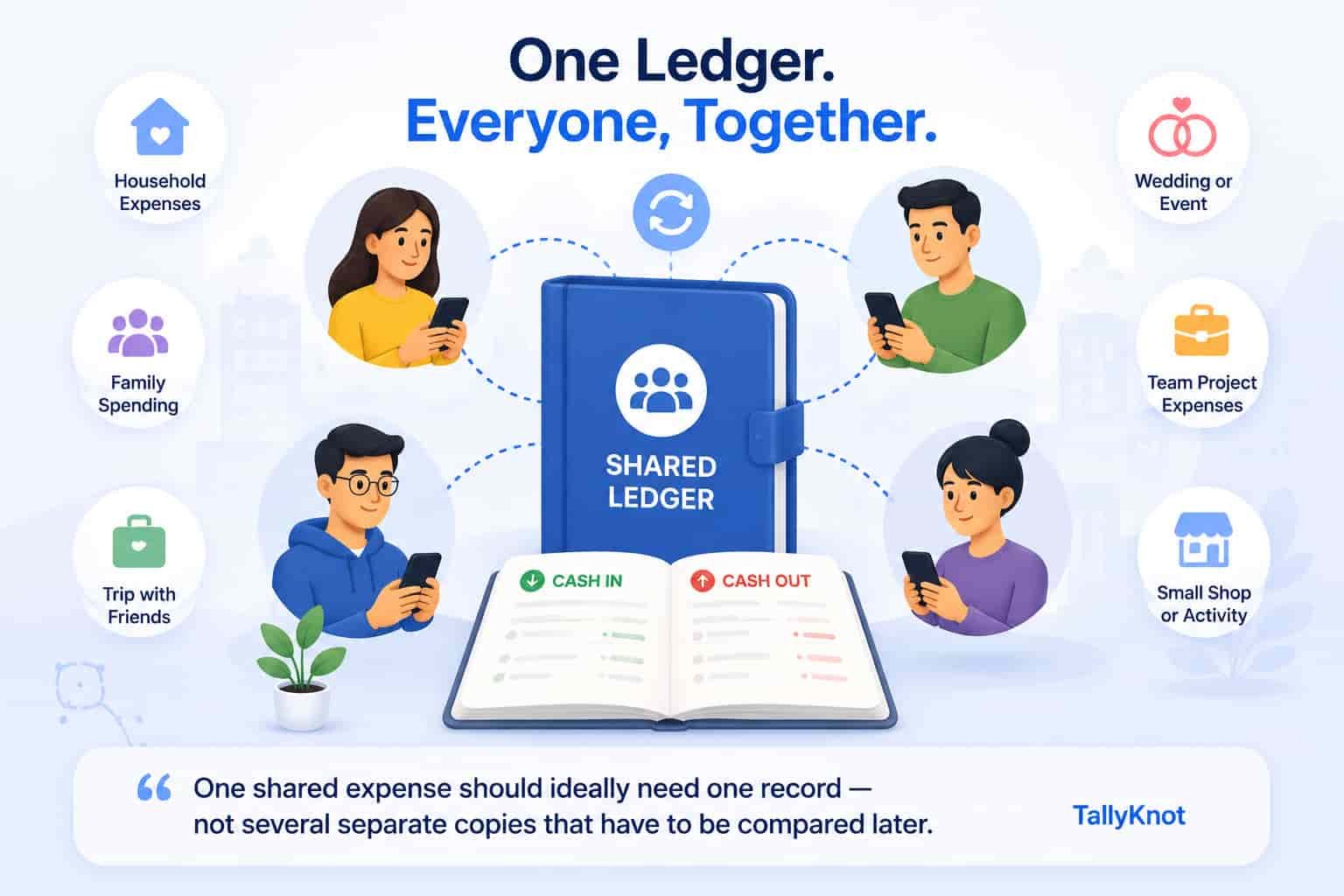
A shared ledger is a TallyKnot ledger that more than one person can access.
Instead of saying, “I'll keep my expenses on my phone and you keep yours on yours,” everyone works with one common financial record.
For example, a shared ledger could be useful for:
- A couple managing household spending
- Family members recording shared expenses
- Friends travelling together
- A group planning a wedding or event
- A small team managing project expenses
- People recording money for a small shop or activity
The important idea is that the ledger belongs to the shared activity, not to one person's private list of notes.
One shared expense should ideally need one record — not several separate copies that have to be compared later.
One person creates the ledger and becomes its owner
Every TallyKnot ledger begins with an owner.
The person who creates the ledger becomes responsible for managing it. The owner has the highest level of control over that ledger, including member management and broader control over its entries.
You do not need to add members while creating the ledger. You can create it first, begin using it yourself and invite other people later when sharing becomes useful.
Sharing a ledger does not mean giving every member exactly the same level of control. TallyKnot keeps an owner role and a member/editor role so the ledger can still be managed safely.
How do you add another person?
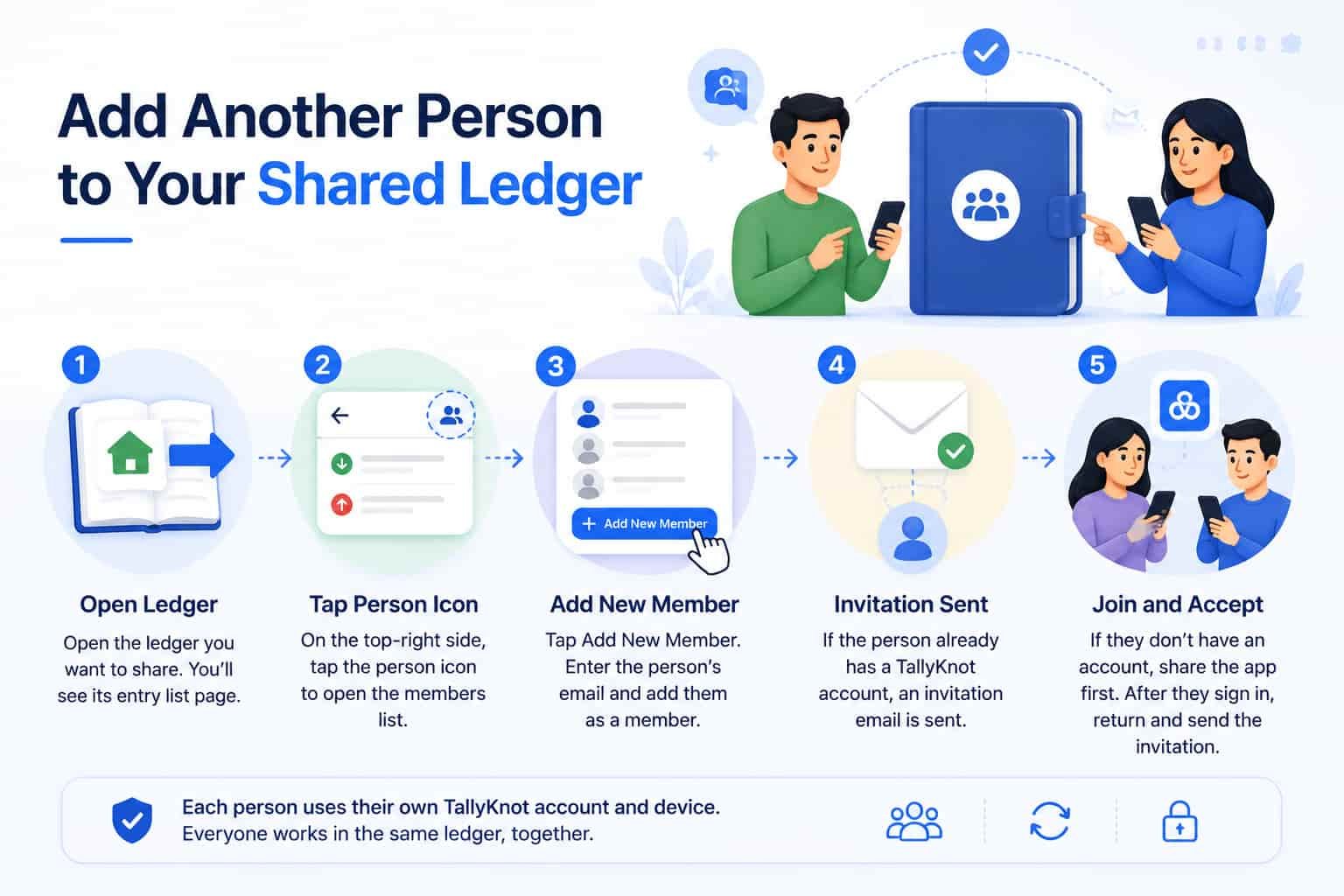
To add another person to a ledger, first open the ledger you want to share. Opening the ledger takes you directly to its entry list page.
On the top-right side of the entry list page, you will find the person icon. Tap this icon to open the members list for that ledger.
From the members list, tap Add New Member. You can then enter the person's TallyKnot account email and add them as a member of the ledger.
If the person already has a TallyKnot account, TallyKnot sends an invitation email to that account. After they sign in to TallyKnot, they can accept the invitation and join the shared ledger.
If the person does not have a TallyKnot account yet, you can first share the TallyKnot app with them and ask them to create an account. Once they have signed in, return to the ledger's members list, add their account email, and send the invitation.
The invited person decides whether to join
An invitation does not immediately give someone active access.
The invited person can review the invitation in TallyKnot and choose whether to accept or reject it.
Accepting or rejecting an invitation requires internet access because that decision changes the person's membership online.
Once the invitation has been accepted successfully, that person becomes an active member of the shared ledger.
From that point, both people can have the ledger available through their own TallyKnot accounts instead of keeping completely separate expense lists.
Now both people can work with the same ledger
This is where shared expense tracking becomes useful.
Imagine John and Mark share a ledger called Home Expenses.
John goes to the supermarket and spends ¥4,500. He records that payment as Cash Out.
Later, Mark pays a ¥7,000 electricity bill from another Android phone. He records his own Cash Out in the same shared ledger.
They do not need to send each other screenshots or manually combine the two transactions.
Once their changes are successfully synchronized, both accepted entries form part of the same online ledger, and each member's device can retrieve the updated information.
| Member | Action | Shared ledger result |
|---|---|---|
| John | Adds ¥4,500 supermarket Cash Out | The expense becomes part of Home Expenses after synchronization. |
| Mark | Adds ¥7,000 electricity Cash Out | The bill becomes part of the same ledger after synchronization. |
| John | Synchronizes later | His device can receive Mark's accepted electricity entry. |
| Mark | Synchronizes later | His device can receive John's accepted supermarket entry. |
What happens when a member adds a new transaction?
When a member records a new Cash In or Cash Out, TallyKnot does more than simply add another number to the screen.
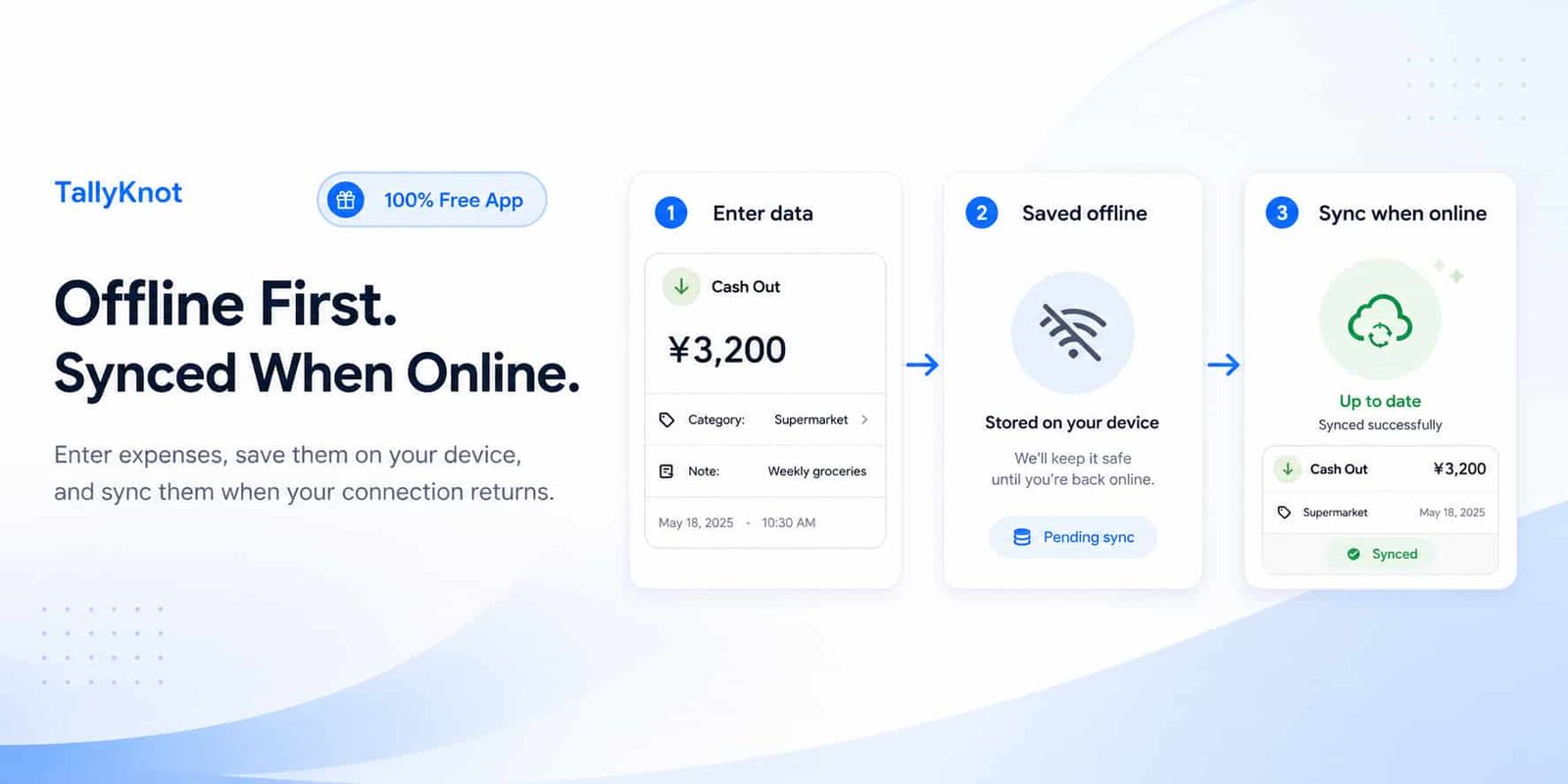
The app saves the supported change on that member's device first. If internet access is available, it can then send the pending operation online.
Once the server accepts the transaction, the shared ledger's official entry data and totals are updated together.
That last part matters.
TallyKnot does not separately save an expense and then hope the Cash Out total gets corrected later. Accepted entry changes and the corresponding ledger totals are handled together so members are not working from independently calculated totals.
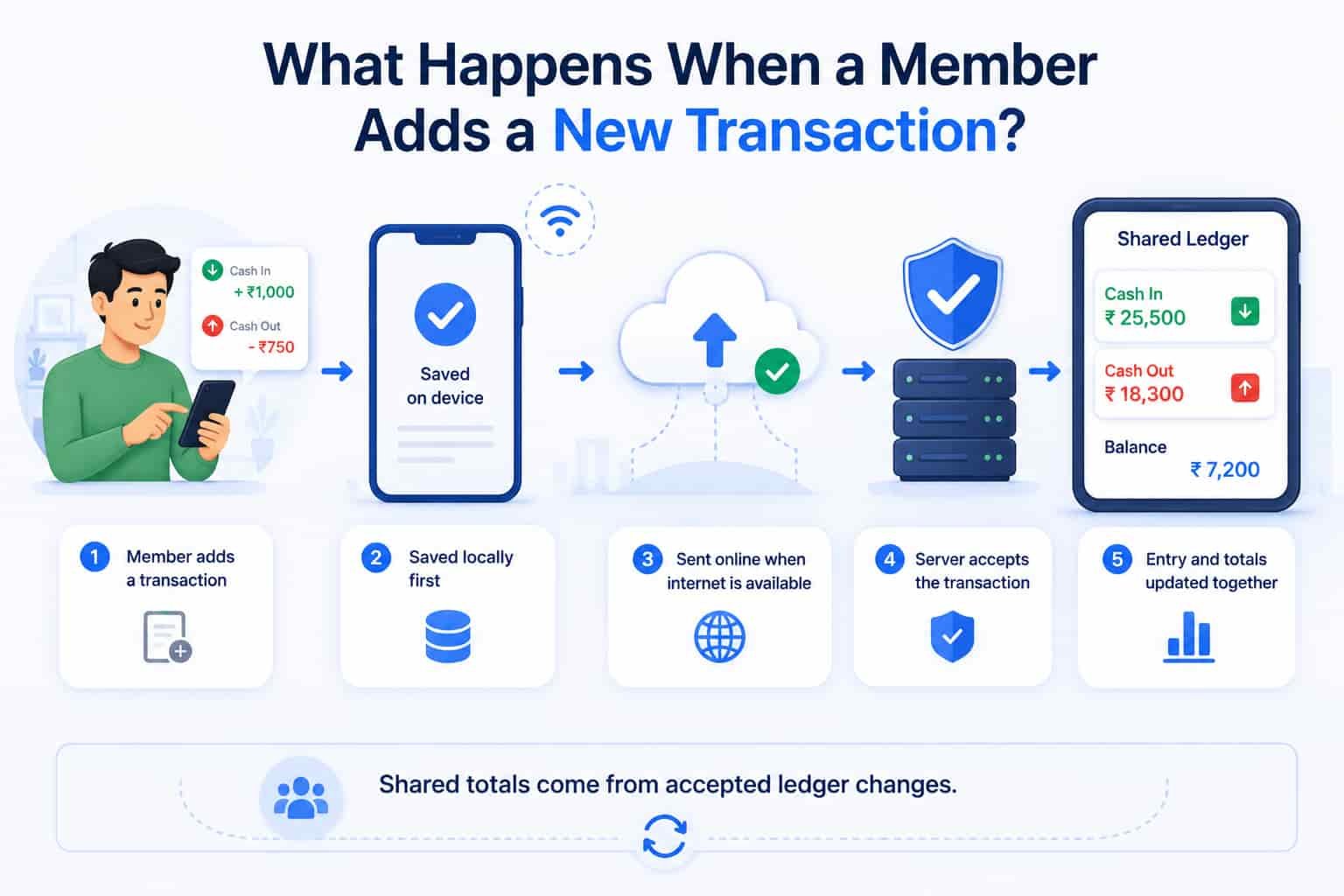
When an entry is successfully created, updated or deleted online, TallyKnot updates the affected Cash In or Cash Out totals as part of the same protected operation.
What if a member edits an entry?
Expenses sometimes need correcting.
Maybe John originally recorded ¥4,500 for groceries but later notices that the receipt was actually ¥4,250.
When an allowed update is synchronized successfully, TallyKnot does not simply add the new amount on top of the old one.
It removes the old contribution from the ledger totals and applies the new contribution.
So changing:
Grocery Cash Out: ¥4,500 → ¥4,250
changes the shared Cash Out total by the difference rather than treating the corrected transaction as another expense.
Other members can then receive the accepted updated version through synchronization.
What if an entry changes from Cash In to Cash Out?
TallyKnot also has to handle larger corrections properly.
Imagine a transaction was accidentally entered as Cash In when it should have been Cash Out.
An accepted correction needs to do two things:
- Remove the amount from the old Cash In total.
- Add it to the Cash Out total.
The same principle applies whenever an entry is updated: the old transaction's effect is removed and the new transaction's effect is applied.
This helps keep the shared totals consistent even as records are corrected over time.
What happens when someone deletes an entry?
Deletion is especially important in a shared ledger because another person's phone may still have an older copy of the transaction.
Suppose John deletes the ¥4,250 supermarket expense.
When that deletion is accepted online:
- The entry stops being part of the active ledger.
- Its amount is removed from the appropriate total.
- The active entry count is adjusted.
- The deletion becomes part of the ledger's synchronization history.
That final point is important because Mark's phone might not be online when John deletes the transaction.
When Mark synchronizes later, TallyKnot still needs a way to tell his device:
This entry was deleted. Do not keep showing your older local copy.
TallyKnot keeps deletion information in its synchronization history so a device that has been offline can learn that an old entry is no longer active when it eventually reconnects.
Can every member edit or delete every transaction?
No. Shared access does not mean every member can freely change everything.
TallyKnot currently uses two main ledger roles:
| Role | Entry access |
|---|---|
| Owner | Can create entries and can update or delete active entries in the ledger. |
| Editor | Can create entries and can update or delete entries originally created by that editor. |
These rules are checked by TallyKnot's online service when a protected change is submitted. They are not based only on whether a button happens to be visible on the phone.
This is useful in a shared ledger because it prevents one editor from simply changing another editor's transaction without permission.
What if someone is offline while using the shared ledger?
A shared ledger does not require every member to be online at exactly the same moment.
Suppose Mark is travelling and temporarily loses internet access.
He records a supported Cash Out while offline. TallyKnot can save the pending change on his device first.
At the same time, John may be online on another device and add a different entry.
When Mark's internet connection returns, TallyKnot does not simply throw away his offline work and replace everything with John's online copy.
The synchronization process handles waiting local operations first. After those pending changes have been processed, the app can download newer accepted changes from the shared online ledger.
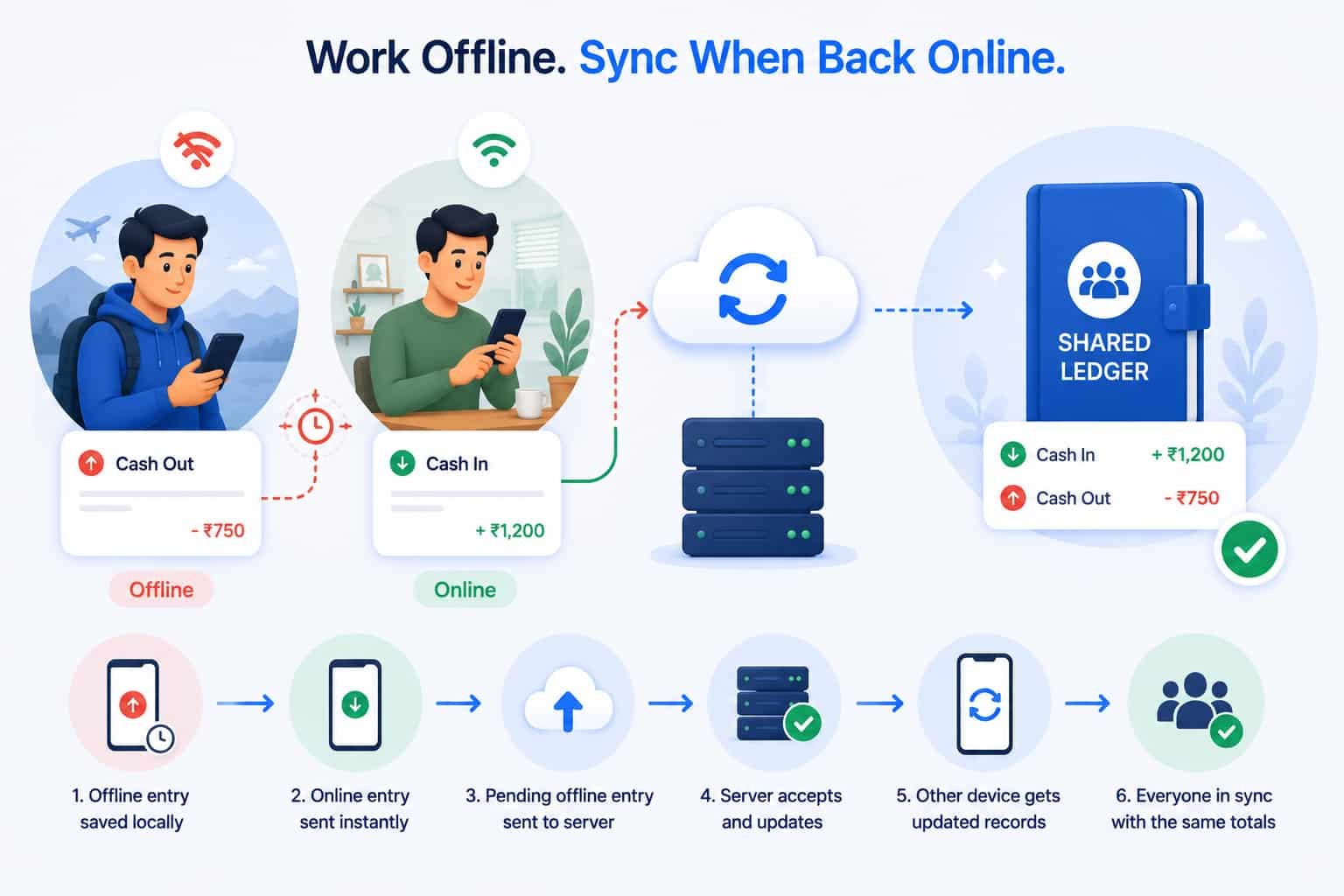
Supported entry work can wait on a member's device while offline. When connectivity returns, TallyKnot can process those pending changes and then retrieve newer shared ledger updates.
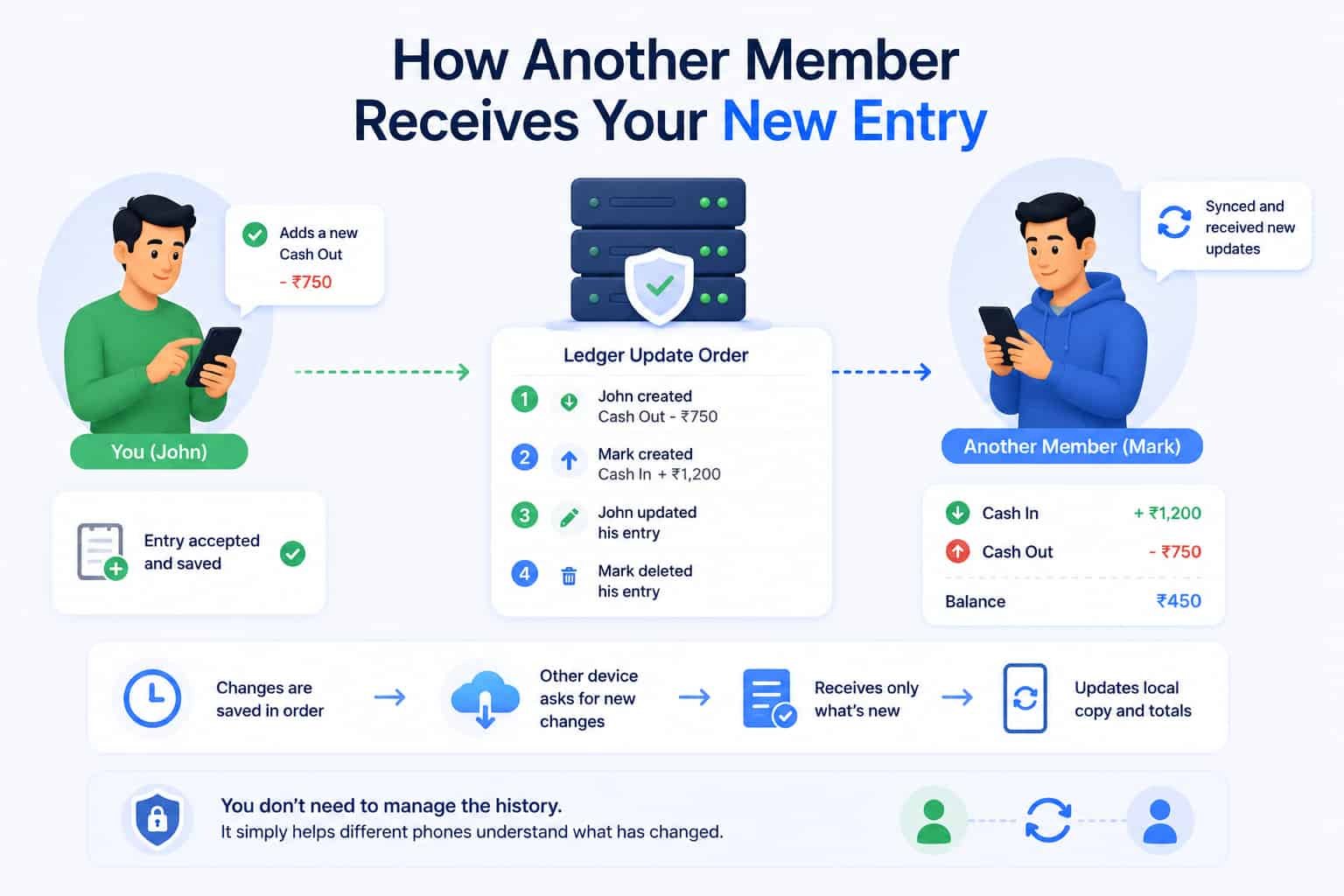
How does another member receive your new entry?
TallyKnot keeps an ordered record of successful ledger entry changes.
In normal user terms, you can think of it as a list that says:
- John created this entry.
- Mark created another entry.
- John updated his entry.
- Mark deleted his entry.
Each successfully accepted change receives its place in that ledger's update order.
When another device synchronizes, it can request the changes that happened after the last point it already knows about instead of having to guess which transactions are different.
The app then updates its local working copy with the accepted entries and totals it receives.
As a user, you do not need to see or manage this update history. Its job is simply to help different phones understand what has changed.
What if two devices have different versions of the same entry?
This is one of the difficult parts of building a shared expense tracker.
Imagine John and Mark both have a local copy of the same transaction.
John's phone updates it first and that change is accepted online. Mark's phone is still holding an older version.
Mark's older copy should not be allowed to silently replace John's newer accepted version as though nothing happened.
TallyKnot keeps a version for each entry. When an update or deletion reaches the server, the version the device expects is compared with the current accepted version.
If the entry has already changed, the stale operation is not silently applied over the newer information.
The current online version can then be used to bring the device back toward the latest state.
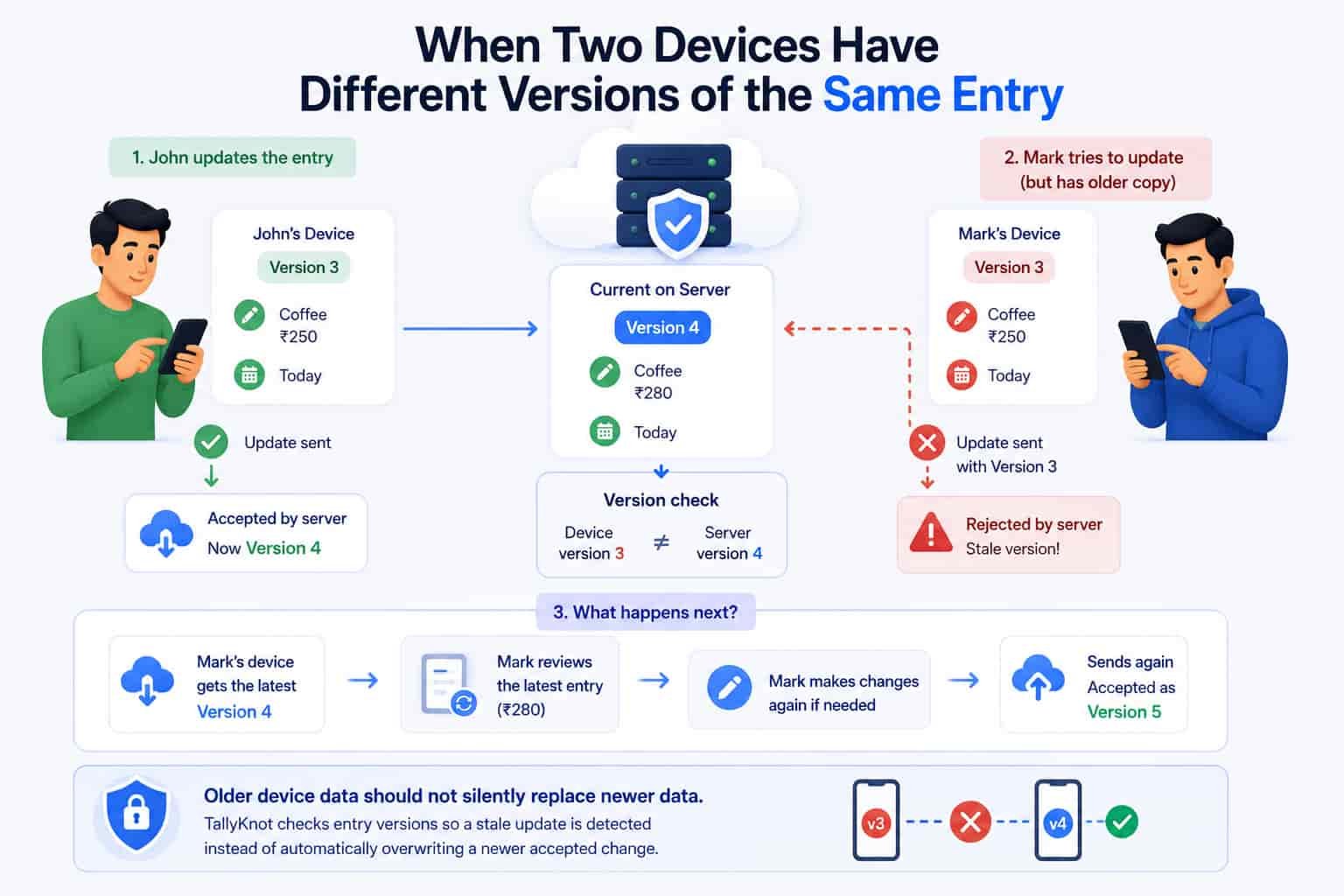
Shared ledgers need more protection than a simple upload button. TallyKnot checks entry versions so a stale update can be detected instead of automatically overwriting a newer accepted change.
What if a network request is accidentally sent twice?
Mobile internet is not always reliable.
Sometimes a phone sends an update successfully but loses its connection before receiving the confirmation. The device may need to send the request again.
For an expense tracker, that must not mean the same ¥5,000 Cash Out gets added twice.
TallyKnot gives each logical entry operation its own identity.
If the same successfully accepted operation is retried with the same information, the server can recognize that it has already been handled and return the previous result instead of performing the financial change again.
This protection works behind the scenes. The user does not need to manually check request numbers or network retries.
Why keeping the totals together matters
In a shared ledger, the transaction list and the totals cannot be treated as two unrelated things.
Imagine an expense is successfully deleted but the Cash Out total still includes it. John could see one balance while Mark sees another.
TallyKnot's accepted entry operations update the relevant transaction, ledger totals and synchronization record together.
If something fails during that protected server operation, the change is not supposed to leave half of the financial state updated and the other half unchanged.
This is one of the ways TallyKnot works to keep a shared ledger consistent even when several devices are contributing records.
What happens if the owner removes a member?
Sharing does not have to be permanent.
The ledger owner can remove an editor when that person should no longer have active access.
Once the membership change is accepted and devices synchronize, the removed person is no longer treated as an active member of that ledger.
Historical financial records should not be rewritten simply because someone's membership later changes. Transactions that were legitimately created while that person was an active member remain part of the ledger's financial history.
Can a member leave a shared ledger?
Yes. An editor does not have to remain in a ledger forever.
A member can leave the ledger, while the owner remains responsible for it.
As with other membership changes, leaving requires online coordination because the membership status has to be changed for the shared account data rather than only hidden on one phone.
Removing or leaving a ledger changes future access. It does not mean previously accepted financial records should disappear from everyone else's history.
A shared household ledger example
Here is what a normal week might look like for two people using one TallyKnot ledger.
| Day | Member | Action |
|---|---|---|
| Monday | John | Adds ¥4,250 groceries as Cash Out. |
| Tuesday | Mark | Adds ¥7,000 electricity bill as Cash Out. |
| Wednesday | John | Corrects his grocery expense after checking the receipt. |
| Thursday | Mark | Records money received as Cash In while temporarily offline. |
| Later Thursday | Mark | Reconnects and his pending Cash In synchronizes. |
| Friday | John | Synchronizes and receives Mark's accepted change. |
Neither person needs to maintain a separate spreadsheet and compare it at the end of the week.
They are contributing to the same ledger and allowing synchronization to bring accepted changes between their devices.
Do shared ledger members need to use the same phone?
No. The point of a shared TallyKnot ledger is that each person can use their own TallyKnot account and Android device.
Once a person's membership is active and their device has synchronized the ledger information, they can work with the local copy on that device.
Online synchronization then provides the connection between those separate devices.
This also means that when someone signs in on another Android device, the synchronized online data matters. The new phone can retrieve the ledgers that account is currently allowed to access rather than depending on files stored only on an older phone.
Shared does not mean internet is required every second
There is an important difference between a shared online ledger and an app that refuses to work whenever the network disappears.
TallyKnot uses online synchronization so multiple people and devices can work with shared data, but it also keeps local data on the Android device.
That allows supported entry work to continue during temporary connection problems.
When connectivity returns, the waiting work can be processed and newer changes from other members can be downloaded.
Some collaboration actions — such as sending an invitation, accepting one, removing a member or leaving a ledger — naturally require internet because they change who is allowed to access shared online data.
Why use a shared expense tracker instead of separate notes?
Separate notes can work when only one person handles the money.
They become much harder to manage when several people are involved.
With separate records, someone eventually has to ask questions such as:
- Did you already add this expense?
- Which amount is the corrected one?
- Did you remove that cancelled payment?
- Does your total include my transactions?
- Which person's list is the latest?
A shared ledger gives those records one common destination.
Members can still use their own phones, but the synchronized ledger becomes the place where accepted transactions and totals come together.
One ledger, different people, one consistent record
TallyKnot's shared ledger feature is designed for situations where more than one person needs to keep track of the same money.
The owner creates the ledger and invites trusted members. Each accepted member uses their own account. They can record Cash In and Cash Out from their own devices, and supported work can continue locally when a connection temporarily disappears.
When devices synchronize, pending operations are sent, newer accepted changes are retrieved, and the local copies move toward the same shared ledger state.
Updates adjust the previous transaction rather than creating an extra amount. Deletions are carried to other devices instead of leaving old active copies behind. Entry versions help protect newer accepted information from stale device updates, and transaction totals are updated together with accepted financial changes.
From the user's side, the goal is much simpler: everyone who is managing the money should be able to look at the ledger and work from the same set of records instead of trying to piece several different lists together later.