Record cash in and cash out the moment it happens, keep a separate cashbook for anything you want to follow, and share it with the people you trust. Use the Android app, even offline, or open TallyKnot in any browser on your iPhone, Mac or PC. Same account, same cashbooks, always in sync.
See all the ways to use TallyKnotTallyKnot is one expense tracker you can open three ways. Pick the one that fits the device in your hand. With an account, the Android app and the browser show the same cashbooks.
Record money the moment it moves, wherever you are, even with no signal.
Sign in from Safari, Chrome, Edge or any modern browser. Nothing to install, and your cashbooks are saved to your account.
TallyKnot Local runs right in your browser. No sign-up, nothing to install, and your entries stay on your own device.
Create as many cashbooks as you need and keep each part of your life separate. Here are some of the ways people use TallyKnot.
Follow groceries, bills and school costs in one family cashbook that everyone at home can add to.
Write down every coffee, ride and online order the moment it happens, and see where your money really goes.
Make a cashbook for a holiday, a wedding or a party, invite the people involved and keep every cost together.
Rent, electricity and shared shopping in one place, so nobody has to remember who paid for what.
Record daily cash sales and expenses, keep the till honest and check your balance at the end of the day.
Collect fees, pay for equipment and show every member the same clear record of the group's money.
Start with a simple amount and add more details only when you need them. Create separate cashbooks, organize entries, share with other people, see the whole picture on the web and keep recording on your phone even when your internet connection isn't there.
Keep personal expenses separate from groceries, a trip, wedding costs, a project, savings or a small shop. Create a cashbook for each thing you want to track.
Record money coming in or going out with the amount, date, time and the details that matter to you.
Organize entries with categories, payment methods, notes, names and reference numbers when you need more context.
Invite family, friends or teammates to the same cashbook so everyone can contribute without keeping separate records.
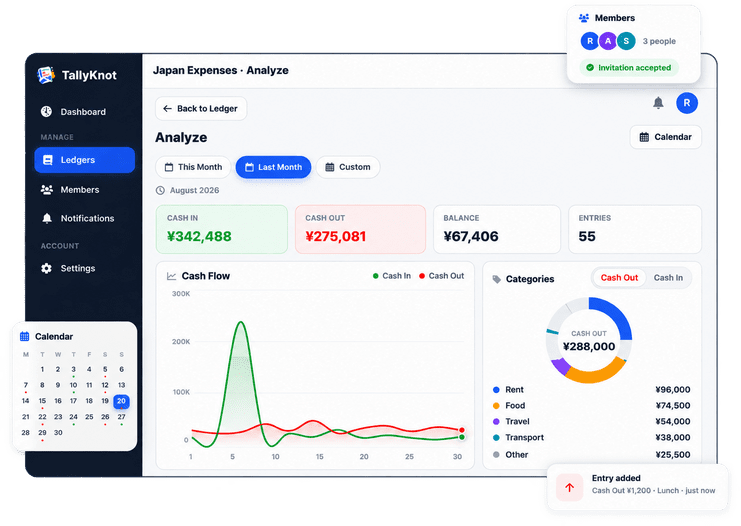
See your total cash in, total cash out and current balance without calculating everything yourself.
On the web, see cash in and cash out as a flow chart, and break spending down by member, category and payment method.
Every day with money movement gets a green or red dot. Pick a day to see what came in and what went out.
Download any cashbook from the web dashboard as an Excel sheet or a PDF report, to keep, print or share.
Use TallyKnot in English or Japanese and choose the language that feels most comfortable for you.
Add an expense at the shop, record a payment when you receive it, or update a shared cashbook while you're away from your desk. TallyKnot is designed around the device you already carry every day.
Record cash in or cash out without turning a simple transaction into a complicated accounting task.
Use categories, payment methods, notes, names and references when an entry needs more context.
Continue working with the records on your phone when your connection drops, then sync pending changes when you're back online.
Sign in from any browser with the same account you use on your phone, or use the web on its own if you don't have an Android phone. See every cashbook, add entries with a keyboard, invite members, and turn your records into charts you can actually read.
This month
There is nothing to install. Open your browser, sign in, and everything you have recorded on your phone is already there.
Use the same email and password as the Android app. New here? Create a free account in a minute.
Your cashbooks from the app are already here, with their balances. Start a new one for anything you track.
Record cash in and cash out with all the details, and invite members by email to share the ledger.
See where the money goes in charts, and open the calendar to look at any single day.
Add entries and manage members on either one. Use the app when you're on the move, even offline, and the web when you want a bigger screen. Everything you change in one place shows up in the other.
Built for the moment the money moves, wherever you are.
Built for the whole picture, on any phone, tablet or computer.
Stop passing expense lists back and forth. Invite people you trust to the same cashbook so everyone adds to one shared record, from the Android app or the web.
Add members to a cashbook without sharing your account password or your phone.
Entries stay connected to the member who created them, making shared records easier to understand.

Offline mode is part of the TallyKnot Android app. It saves your entries on your phone first, so you can keep working without internet. Once you reconnect, your changes sync to your account — keeping your ledger up to date and ready when you sign in on the web or another device.

In the Android app, keep adding entries even when there’s no internet connection.
Your saved changes sync to your TallyKnot account after you reconnect.
Sign in elsewhere and continue with your latest synced ledger.
Want to record without internet? Install the Android app. The web dashboard needs a connection, so use it to review and manage your synced cashbooks.
Get it on Google PlayTallyKnot is a simple record-keeping app. You decide what goes in, who can see it and when it leaves.
TallyKnot never connects to your bank or cards and never moves money.
We do not sell your account information or your cashbook records.
Take a copy of any cashbook as an Excel or PDF file from the web dashboard.
Delete your account whenever you want from the account deletion page.
Set a budget or a savings goal with a free tool, then follow it day by day in your cashbook.
Yes. The Android app and the web dashboard are free to use, with no subscription. The service is supported by advertising.
Yes. Open TallyKnot in any browser on an iPhone, iPad, Mac or Windows PC and sign in to the web dashboard. You get the same cashbooks, entries, charts and members as in the Android app.
Yes. TallyKnot Local is a free cashbook that runs in your browser with no account and nothing to install. Your entries stay on your own device. Create a free account when you want to sync between devices or share a cashbook.
Yes. The Android app saves your entries on your phone first, so you can keep recording offline. When you are back online, your changes sync and shared cashbooks receive the latest updates.
Invite people to a cashbook by email. They join with their own account, so you never share your password. Every entry shows who recorded it, and you can remove a member from a cashbook you own at any time.
Yes. From the web dashboard you can download a cashbook as an Excel or PDF file, so you always have your own copy.
No. TallyKnot is a record-keeping app. It does not connect to your bank or cards and does not move money. You decide what to record.
TallyKnot is available in English and Japanese, in the app and on the web.
Download TallyKnot on Android, or sign in from any browser on your iPhone, Mac or PC. Create a cashbook and start recording the money that matters to you, on your own or together with the people you share it with.
 TallyKnot